An agent that writes its own Excel files, then checks them
A from-scratch agentic CLI that turns one sentence into a formatted .xlsx: formulas, charts, conditional formatting, and a validator the agent writes for itself. No framework. One brain, two wire protocols.
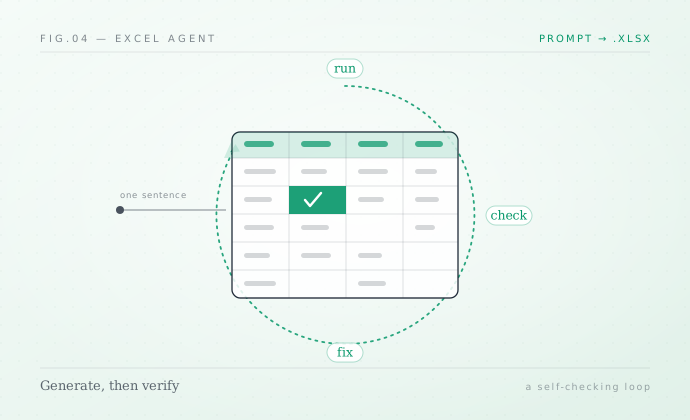
The model never writes a spreadsheet. It writes Python that writes a spreadsheet, then writes a second script to check its own work, and loops until the checker is happy.
I wanted to see how far a hand-built agent could go on a genuinely fiddly task: producing an Excel workbook a person would actually be happy to send. Not a CSV with a header row, but a formatted .xlsx with a title bar, banded rows, frozen panes, real formulas, a chart, and conditional formatting. You type one sentence, like Build a Q1 sales workbook with a chart, and a finished file lands on disk.
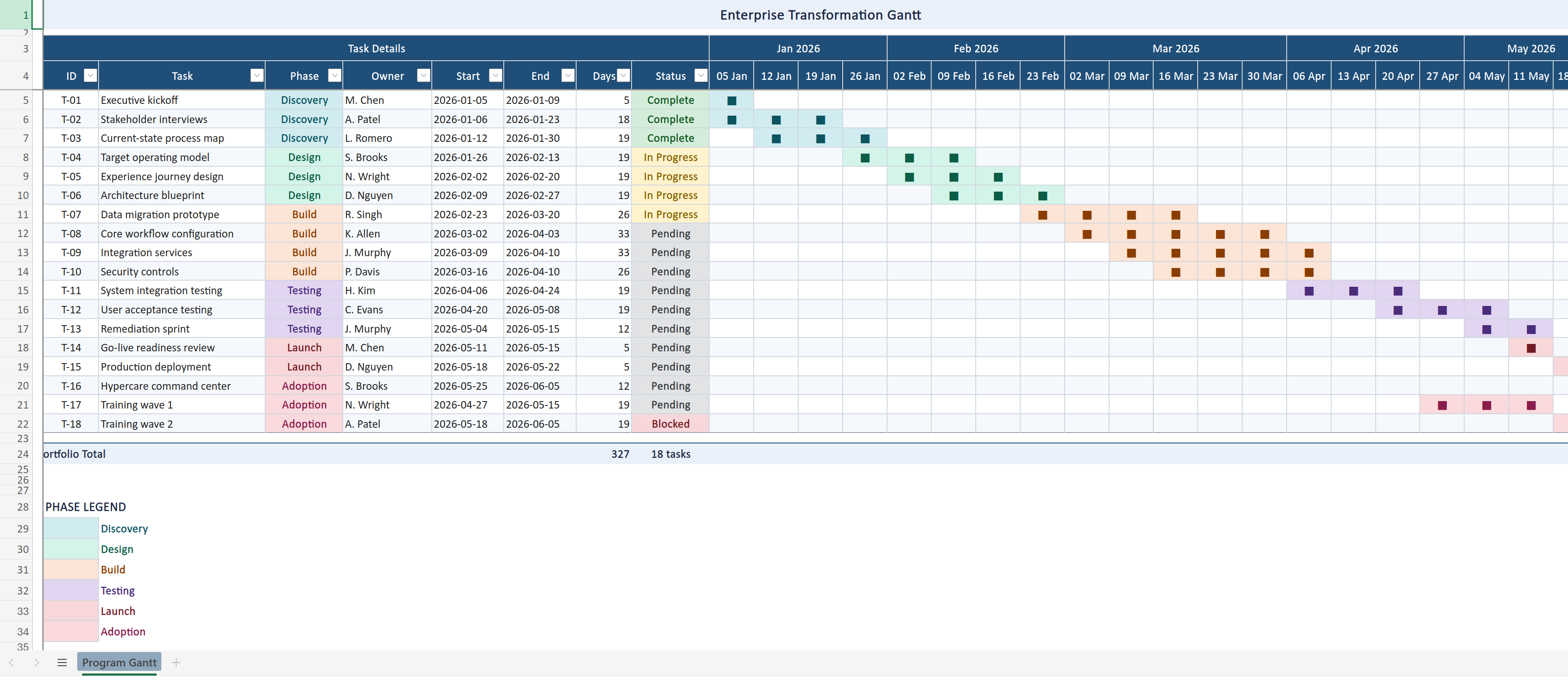
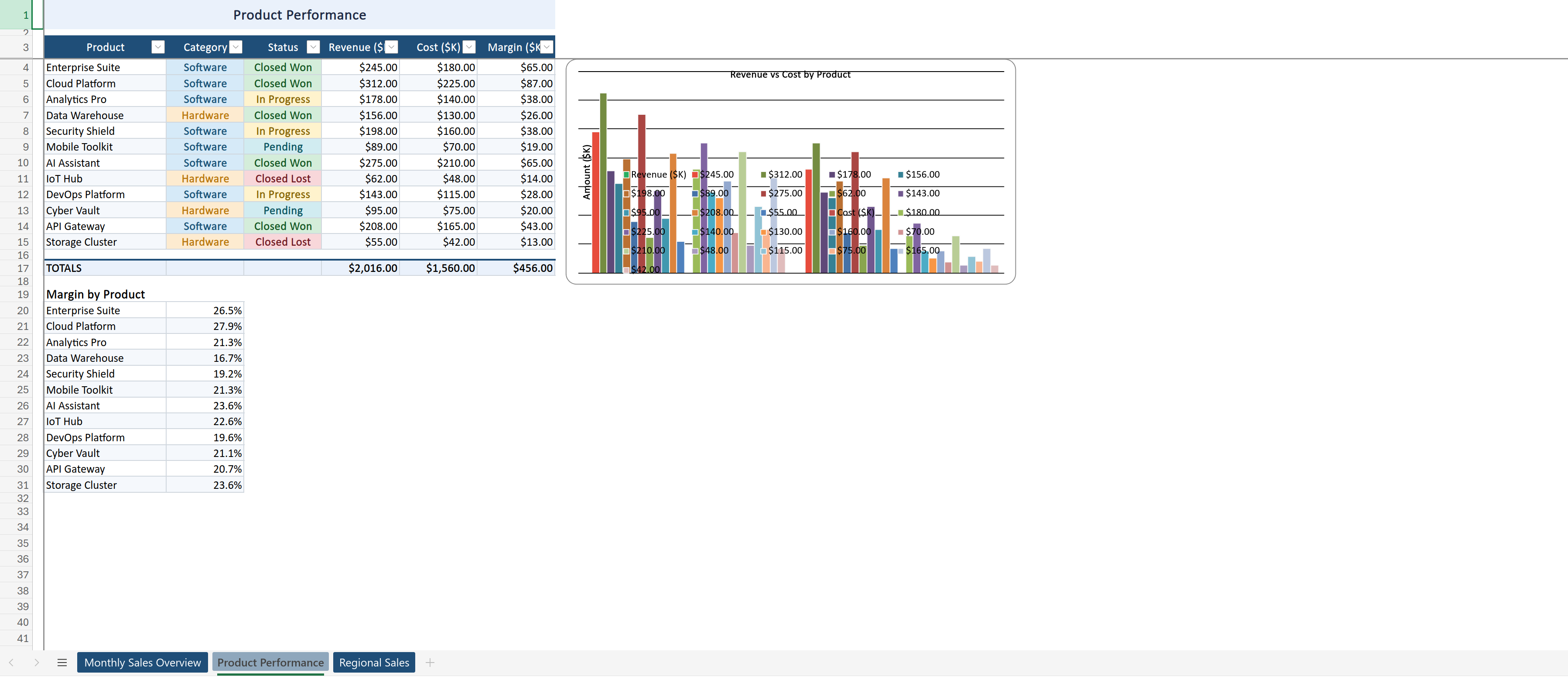
The result is a single-file CLI agent. No LangChain, no AutoGen: I wrote the tool loop, the sandbox, and the provider plumbing myself, because the whole point was to understand the moving parts. The code is at vnimesha/Excel-Generate-Agent. Here is what it generates from a prompt:
The shape of the agent
At its heart this is the same loop every coding agent runs. The model is given four sandboxed tools, all confined to one fresh working directory:
- Bash to run commands (
python gen.py,python check.py), - Write to create a file,
- Edit to change exact text in a file,
- Read to read one back.
I define the tools once in an Anthropic-style schema and convert them to the OpenAI function shape at startup, so the same definitions drive both providers:
_TOOLS = [
    {"name": "Bash",  "description": "Run a shell command in the sandboxed cwd...",
     "input_schema": {"type": "object",
        "properties": {"command": {"type": "string"}, "description": {"type": "string"}},
        "required": ["command"]}},
    {"name": "Write", "description": "Write a file in the working dir, overwriting...",
     "input_schema": {"type": "object",
        "properties": {"file_path": {"type": "string"}, "content": {"type": "string"}},
        "required": ["file_path", "content"]}},
    # Edit, Read ...
]
The loop is unremarkable on purpose: send the conversation, get back text and tool calls, execute the tools, append the results, repeat. It stops when the workbook exists and validation passes, or when it hits MAX_TURNS (45 by default). The interesting decisions are everywhere around that loop.
Self-verification is the whole game
The single idea that makes this reliable is simple: the agent writes its own validator. It does not just write gen.py (the openpyxl generator) and call it done. It also writes check.py, a script full of assertions about the workbook it was supposed to produce, runs it, and treats a failure as a task to fix.
1. Write gen.py  ->  python gen.py   ->  output.xlsx
2. Write check.py ->  python check.py  ->  "OK"  or  an assertion error
3. If not OK: make the smallest edit to gen.py, re-run, re-check.
4. Stop the moment check.py prints OK.
This is the same principle I keep coming back to with agents: they get trustworthy when they can grade their own work against an explicit standard, instead of declaring victory because the last message sounded confident. A workbook that opens with zero formula errors and passes a written checklist is a much stronger contract than "the model said it made a spreadsheet."
One brain, two wire protocols
I wanted the same agent to run against a hosted model or a local one, so it is provider-agnostic behind a single interface:
- OpenAI path talks to
/v1/chat/completionswith function-style tool calls. - Ollama path talks to
/v1/messages, the Anthropic-compatible endpoint, withtool_useblocks, over raw HTTPX.
The tool definitions, the sandbox, and the loop are identical. Only the adapter that serializes a request and parses the stream differs. Switching is one line in .env:
PROVIDER=openai          # or "ollama"
OPENAI_MODEL=gpt-4.1-mini
OLLAMA_MODEL=qwen3-coder:30b
Same brain, two wire protocols. One nice side effect: I can develop against a local qwen3-coder model for free and only reach for a hosted model when I want the extra capability.
The real product is the system prompt
Here is the part that surprised me most. The hardest engineering is not the loop. It is the system prompt, prompt.txt, which encodes an entire spreadsheet design system so the output looks deliberate instead of generic. It is essentially a senior analyst's taste, written down as rules the model must follow.
A few of the mandatory rules give the flavor:
The first 3 rows are RESERVED.
  Row 1 -> TITLE BAR    merged across the data width, height 28
  Row 2 -> BREATHING ROW blank, height 6
  Row 3 -> HEADER ROW   bold white on #1F4E78, height 22
  Row 4+ -> DATA

Freeze panes below the last header row, at column B.
If a label conceptually covers several columns (a quarter over its
months), it MUST be a merged group header spanning those columns.
Never produce placeholder content like "Sample data" or "TBD";
synthesize realistic, domain-appropriate data.
It also tells the model how to work, not just what to build: plan in one short paragraph, never explore the filesystem, fix forward with the smallest edit rather than rewriting gen.py from scratch, and stop the instant the check passes. That last set of rules is pure token discipline. Every wasted "let me look around" turn costs context and money, so the prompt forbids it.
This is context engineering, not prompt magic
Encoding the design system and the openpyxl recipes directly into the prompt means the model spends its context on the task, not on rediscovering how to style a header every time. It is the same lesson as my piece on why everything has to fit in one context window: decide what earns a place in the prompt, put the stable rules up front, and keep the variable part small.
Making it survive contact with reality
A demo that works once is easy. A few choices push this toward something you can actually leave running:
- Output truncation. Tool output is capped to the first and last 4,000 characters. A generator that dumps a huge traceback or prints a whole sheet cannot blow up the context window; the agent still sees the head and tail where the real error lives.
- Timeouts and retries. Every Bash call has a five-minute ceiling, and API requests retry up to four times with exponential backoff, so a transient network blip does not kill a run.
- Turn and token caps.
MAX_TURNSand a per-turn token budget bound the worst case, and a heartbeat keeps long generations from looking hung. - A real terminal UI. A Rich-based live view streams the model's plan and reasoning, shows each tool call as it happens, and ends with a summary card (file path, size, sheet and chart counts). When an agent is acting on your behalf, being able to watch it think is a feature, not a luxury.
What I took away
Two lessons carried over into everything I have built since. The taste lives in the prompt: a clear, opinionated specification is what separates a generic spreadsheet from one that looks professional, and writing that spec well is most of the work. The reliability lives in the loop: an agent that writes its own validator and iterates until it passes is dramatically more trustworthy than one that simply produces output and hopes. Give a model good tools, a sandbox it cannot escape, and a way to check itself, and a surprising amount of "magic" turns into a tidy, debuggable loop.
The full source, including the provider adapters and the complete design prompt, is at vnimesha/Excel-Generate-Agent.
Vihanga Nimesha
Software & AI engineer building things that ship. More about me