Build your first AI agent: a step-by-step tutorial
A hands-on walkthrough that builds up the agent loop one cell at a time, from a plain LLM that can only produce text to an agent that chains tools to finish a real task.
Run it yourself
The full notebook for this post lives on GitHub: vnimesha/CustomAgents · custom-agent.ipynb ↗. Open it in Jupyter or Colab and run the cells as you read along.
Brain (LLM) + Hands (tools) + a Loop = Agent.
Most people meet AI agents the way you meet a magic trick, finished, polished, and a little mysterious. The thing is, once you build one yourself, the magic flips into something much better: a simple, repeatable pattern you can apply to anything.
This post walks through that pattern from scratch, eight steps, no prior AI experience needed. By the end you'll have a working agent that picks its own tools and chains them together to finish a real task. No frameworks, no SDK abstractions beyond the raw openai client.
What is an AI agent? (the 10-second version)
A plain language model (GPT, Claude, anything in that family) can only read text and write text. That's it. It can't check the clock, do reliable arithmetic, or save a file. It just predicts the next word.
An agent is an LLM that we give two extra things:
- Tools: real functions the model is allowed to call (get the time, do a calculation, write a file...). Think of tools as giving the brain a pair of hands.
- A loop: we let the model use a tool, see the result, think again, use another tool, and keep going until the task is done.
Brain (LLM) + Hands (tools) + a Loop = Agent.
That's the whole concept. Everything else is plumbing.
The steps in this tutorial
We're going to build it up in order. Each step depends on the one before it.
| Step | What you'll do |
|---|---|
| Step 1 | Set up the tools and connect to the model |
| Step 2 | Run a plain LLM, text in, text out (and see why it's not enough) |
| Step 3 | Give the LLM a tool (its first "hand") |
| Step 4 | Let the model decide to use the tool |
| Step 5 | Send the tool's result back so the model can answer |
| Step 6 | Build the agent loop, combine everything into a reusable agent |
| Step 7 | Give the agent a whole toolbox |
| Step 8 | Watch it do a real-world, multi-step task on its own |
Step 1: Set up and connect to the model
First we install the openai library (the code that lets Python talk to the model) and import the helpers we'll need.
You only need to run the install once. If it says "Requirement already satisfied," you're good.
pip install openaifrom openai import OpenAI
import os
import json
from datetime import datetimeConnect with your API key
The client is your phone line to the AI. To make calls you need an API key: like a password that proves you're allowed to use the model.
The code below reads the key from an environment variable called OPENAI_API_KEY so you never paste your secret key into your code.
How to set your key (do this first, then restart your Python session):
- Windows (PowerShell):
setx OPENAI_API_KEY "sk-..." - macOS / Linux:
export OPENAI_API_KEY="sk-..."
If you don't have a key yet, create one in your OpenAI account dashboard.
client = OpenAI(api_key=os.getenv("OPENAI_API_KEY"))

# Quick check that the key was found (it won't print the key itself)
print("API key found!" if os.getenv("OPENAI_API_KEY") else "No API key set.")
Step 2: Run a plain LLM (text in, text out)
Before we build an agent, let's see what a model does on its own.
We send it some text (the input) and it streams back text. "Streaming" just means we print each piece of the answer the moment it arrives instead of waiting for the whole thing; that's why ChatGPT looks like it's typing.
with client.responses.stream(
    model="gpt-4.1-mini",
    input="Explain what an AI agent is, in simple terms, in 3 sentences."
) as stream:
    for event in stream:
        # Each 'delta' is a small chunk of the answer as it's generated
        if event.type == "response.output_text.delta":
            print(event.delta, end="", flush=True)
Notice: the model only produces words. It has no access to your computer, the internet, the time, or anything in the real world. Keep that limitation in mind: it's exactly what tools will fix.
See the problem for yourself
Now ask the model something it cannot actually know: the current time.
no_tools = client.responses.create(
    model="gpt-4.1-mini",
    input="What is the exact current date and time right now?"
)
print(no_tools.output_text)
The model will guess, make something up, or admit it doesn't know. It has no clock. This is the moment we realize: to be useful in the real world, the model needs tools. That's Step 3.
Step 3: Give the LLM a tool (its first "hand")
A tool is just a normal Python function the model is allowed to ask us to run.
There are two parts to every tool:
- The real function: actual Python code that does the work.
- A description (the "schema"): a small dictionary that tells the model the tool's name, what it does, and what inputs it needs. The model reads this to decide when and how to use the tool.
Let's create our first tool: a function that returns the current time.
# 1) The real function: plain Python
def get_current_time():
    now = datetime.now()
    return now.strftime("%Y-%m-%d %H:%M:%S")


# 2) The description the model reads (the 'schema')
tools = [
    {
        "type": "function",
        "name": "get_current_time",
        "description": "Get the current local date and time",
        "parameters": {
            "type": "object",
            "properties": {}  # this tool needs no inputs
        }
    }
]

print("Tool ready. The function returns:", get_current_time())
The model never runs your code
This is important: the model can only say "please run get_current_time for
me." We run it and hand back the result. That separation is a safety feature:
the model can't touch your machine without you in the loop.
Step 4: Let the model decide to use the tool
Now we ask the time question again, but this time we pass tools=tools so the model knows the tool exists.
Here's the key idea: the model won't give a text answer yet. Instead it responds with a request to call our tool, which we can see inside response.output.
Think of it as the model saying: "I can't answer this myself, but you gave me a get_current_time tool, please run it and tell me what it says."
user_input = "What time is it right now?"

response = client.responses.create(
    model="gpt-4.1-mini",
    input=user_input,
    tools=tools  # <-- this is what makes it an agent-style call
)

# Look at what the model decided to do
item = response.output[0]
print("The model responded with type:", item.type)
If the model asked for a tool, we run that tool ourselves:
if item.type == "function_call":
    print("MODEL WANTS TO CALL:", item.name)

    # We run the real Python function
    result = get_current_time()

    print("WE RAN IT, RESULT:", result)
else:
    print("The model answered directly:", response.output_text)
Step 5: Send the result back so the model can finish
The model now knows the time because we told it, but it hasn't written a friendly answer yet. So we make a second call that hands the tool's result back to the model.
Two things make this work:
previous_response_id=response.id: links the new call to the previous one so the model remembers the conversation (the question, and the fact that it asked for the tool).function_call_output: how we deliver the tool's result, matched to the original request using the samecall_id.
Now the model can turn the raw result (like 2026-05-29 14:03:11) into a natural sentence.
second_response = client.responses.create(
    model="gpt-4.1-mini",
    previous_response_id=response.id,   # remember the earlier turn
    input=[
        {
            "type": "function_call_output",
            "call_id": item.call_id,    # answer the specific request
            "output": result            # the value our tool returned
        }
    ]
)

print("FINAL ANSWER:")
print(second_response.output_text)
Pause: notice the full cycle you just did
You completed one full agent cycle:
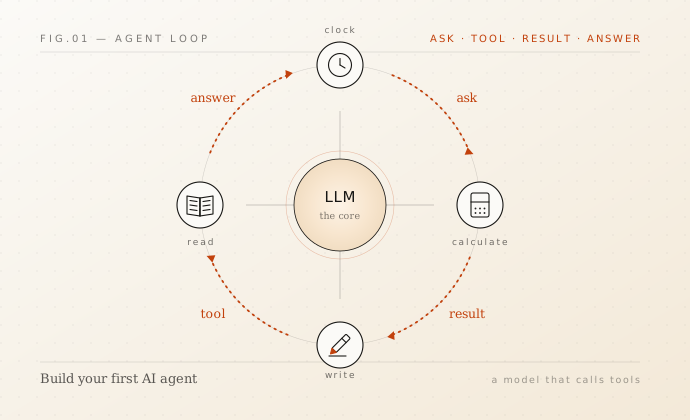
You ask -> Model requests a tool -> You run the tool -> You give back the result -> Model answersThat's the heartbeat of every AI agent. But we did it by hand, for one tool, one time. Real tasks need many steps. So in Step 6 we'll automate this cycle into a loop.
Step 6: Build the agent loop (this is the real magic)
A real task might need several tool calls in a row, for example: "figure out a number, then save it to a file." That's two tools, one after another.
We don't want to write the call-and-respond code by hand each time, so we wrap it in a loop that keeps going automatically:
repeat:
    ask the model
    did it request any tools?
        YES -> run them, send results back, repeat
        NO  -> it's done, return the final answer
This loop is the entire difference between a chatbot and an agent. Below is a small, reusable run_agent function. Read the comments: every line maps to something you already did in Steps 4 and 5.
def run_agent(task, tools, tool_functions, model="gpt-4.1-mini", max_steps=10):
    """Run an AI agent until it finishes the task.

    task           : what you want done (a string)
    tools          : the list of tool *descriptions* the model can see
    tool_functions : a dict mapping tool name -> the real Python function
    max_steps      : a safety limit so the agent can't loop forever
    """
    # First turn: give the model the task and its available tools
    response = client.responses.create(model=model, input=task, tools=tools)

    for step in range(max_steps):
        # Find every tool the model asked for in this response
        tool_calls = [item for item in response.output if item.type == "function_call"]

        # No tool requests => the model is done and has written its answer
        if not tool_calls:
            return response.output_text

        # Otherwise, run each requested tool and collect the results
        results = []
        for call in tool_calls:
            args = json.loads(call.arguments) if call.arguments else {}
            print(f"[tool] Agent uses: {call.name}({args})")

            func = tool_functions[call.name]
            output = func(**args)               # run the real function
            print(f"       -> result: {output}")

            results.append({
                "type": "function_call_output",
                "call_id": call.call_id,
                "output": str(output)
            })

        # Send all results back and let the model think about the next step
        response = client.responses.create(
            model=model,
            previous_response_id=response.id,
            input=results,
            tools=tools
        )

    return "Stopped: reached the maximum number of steps."
max_steps is a deliberate safety net. Without it, a misbehaving model could request tools forever. Ten is a generous ceiling for most tasks; raise it only when you have a real reason to.
Step 7: Give the agent a whole toolbox
One hand isn't enough for real work. Let's give our agent four tools:
get_current_time(): read the clockcalculate(expression): do reliable math (LLMs are surprisingly bad at arithmetic, so we hand it off to Python)write_file(filename, content): save text to a fileread_file(filename): read a file back
For each tool we write the real function and its description, then register everything in two places: the agent_tools list (descriptions the model reads) and the tool_functions dict (so the loop can find and run the actual code by name).
First, the real functions:
# --- The real functions ---

def get_current_time():
    return datetime.now().strftime("%Y-%m-%d %H:%M:%S")


def calculate(expression):
    # Safely evaluate a basic math expression like "45 * 52 / 12"
    allowed = set("0123456789+-*/(). ")
    if not set(expression) <= allowed:
        return "Error: only numbers and + - * / ( ) are allowed."
    try:
        return str(eval(expression))
    except Exception as e:
        return f"Error: {e}"


def write_file(filename, content):
    with open(filename, "w", encoding="utf-8") as f:
        f.write(content)
    return f"Saved {len(content)} characters to {filename}"


def read_file(filename):
    try:
        with open(filename, "r", encoding="utf-8") as f:
            return f.read()
    except FileNotFoundError:
        return f"Error: {filename} does not exist."


# --- The dictionary the loop uses to find a function by its name ---
tool_functions = {
    "get_current_time": get_current_time,
    "calculate": calculate,
    "write_file": write_file,
    "read_file": read_file,
}
Now the matching descriptions the model reads to know how and when to use each tool:
agent_tools = [
    {
        "type": "function",
        "name": "get_current_time",
        "description": "Get the current local date and time.",
        "parameters": {"type": "object", "properties": {}}
    },
    {
        "type": "function",
        "name": "calculate",
        "description": "Evaluate a math expression and return the result. Use this for ALL arithmetic.",
        "parameters": {
            "type": "object",
            "properties": {
                "expression": {
                    "type": "string",
                    "description": "A math expression, e.g. '45 * 52 / 12'"
                }
            },
            "required": ["expression"]
        }
    },
    {
        "type": "function",
        "name": "write_file",
        "description": "Save text content to a file on disk.",
        "parameters": {
            "type": "object",
            "properties": {
                "filename": {"type": "string", "description": "Name of the file, e.g. 'report.txt'"},
                "content": {"type": "string", "description": "The text to write into the file"}
            },
            "required": ["filename", "content"]
        }
    },
    {
        "type": "function",
        "name": "read_file",
        "description": "Read and return the text content of a file.",
        "parameters": {
            "type": "object",
            "properties": {
                "filename": {"type": "string", "description": "Name of the file to read"}
            },
            "required": ["filename"]
        }
    }
]

print(f"Toolbox ready with {len(agent_tools)} tools:", [t["name"] for t in agent_tools])
Why calculate is a tool
LLMs are surprisingly bad at arithmetic: they predict numbers the way they predict words. Handing math off to Python is a free reliability upgrade. The same logic applies to anything deterministic: dates, lookups, conversions. If a function can do it perfectly, don't ask the model to guess.
Step 8: Watch the agent do a real-world task on its own
This is the payoff. We give the agent one plain-English instruction that secretly requires several steps and several different tools, and we let it figure out the rest.
The task:
"I save $45 every week. Work out how much that is per month (assume 52 weeks in a year). Then write a short, friendly savings report to a file called
savings_report.txt, and put today's date at the top."
To finish this, the agent must decide on its own to:
calculatethe monthly amount (45 * 52 / 12)get_current_timeto know today's datewrite_fileto save the report
Watch the [tool] Agent uses: lines below; that's the agent choosing tools and chaining them together, with no further help from us. That is an AI agent doing a real task.
task = (
    "I save $45 every week. Work out how much that is per month "
    "(assume 52 weeks in a year). Then write a short, friendly savings report "
    "to a file called 'savings_report.txt', and put today's date at the top."
)

print("=== AGENT IS WORKING ===\n")
final_answer = run_agent(task, agent_tools, tool_functions)

print("\n=== AGENT'S FINAL ANSWER ===")
print(final_answer)
Check the agent's work
The agent claimed it saved a file. Let's open it ourselves to confirm it really did something in the real world (that's the whole point: it went beyond just talking).
print(read_file("savings_report.txt"))You did it! Recap & next steps
You built a working AI agent from scratch, step by step. The big ideas:
- A plain LLM only produces text: it can't touch the real world (Step 2).
- Tools are normal functions you let the model request. They are its "hands" (Step 3).
- The model never runs code itself: it asks, and your code runs it and reports back (Steps 4-5). Safe by design.
- The agent loop (ask → run tools → return results → repeat) is what lets it chain steps and finish real tasks on its own (Step 6).
- More tools = more it can do (Steps 7-8).
Try these to go further
- Add a new tool, e.g.
list_files()that returns the files in the current folder. Remember the recipe: write the function, add its description toagent_tools, and register it intool_functions. - Give it a harder task, like: "Read savings_report.txt, double every number in it, and save the result to savings_report_2x.txt."
- Add a personality by sending
inputas a list of messages that includes asystemrole. - Connect a real API as a tool (weather, search, a database): same pattern, just a different function behind the description.
The pattern never changes. Everything from a tiny script to a powerful production agent is built on exactly what's in this post.
Vihanga Nimesha
Software & AI engineer building things that ship. More about me